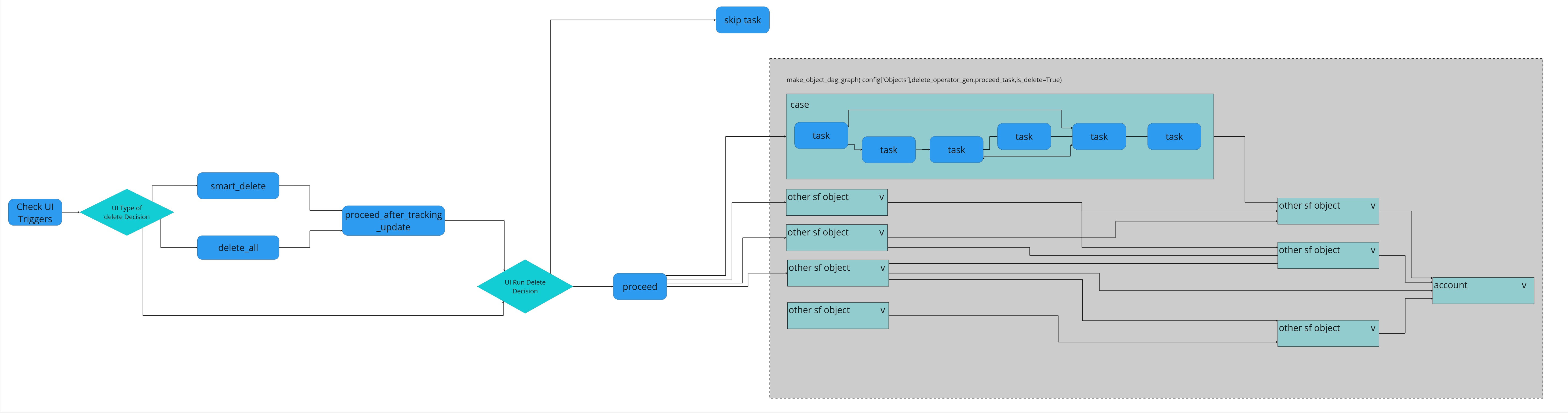
smart_delete DAG
Introduction
The smart_delete DAG provides functionality for marking records for soft deletion and deleting records from Salesforce in a reverse-order representation of the object graph. This ensures that objects are deleted in the correct order to prevent foreign key issues.
Both functionalities can be run independently, allowing users to review records marked for soft deletion before executing the actual deletion.
UI Parameters
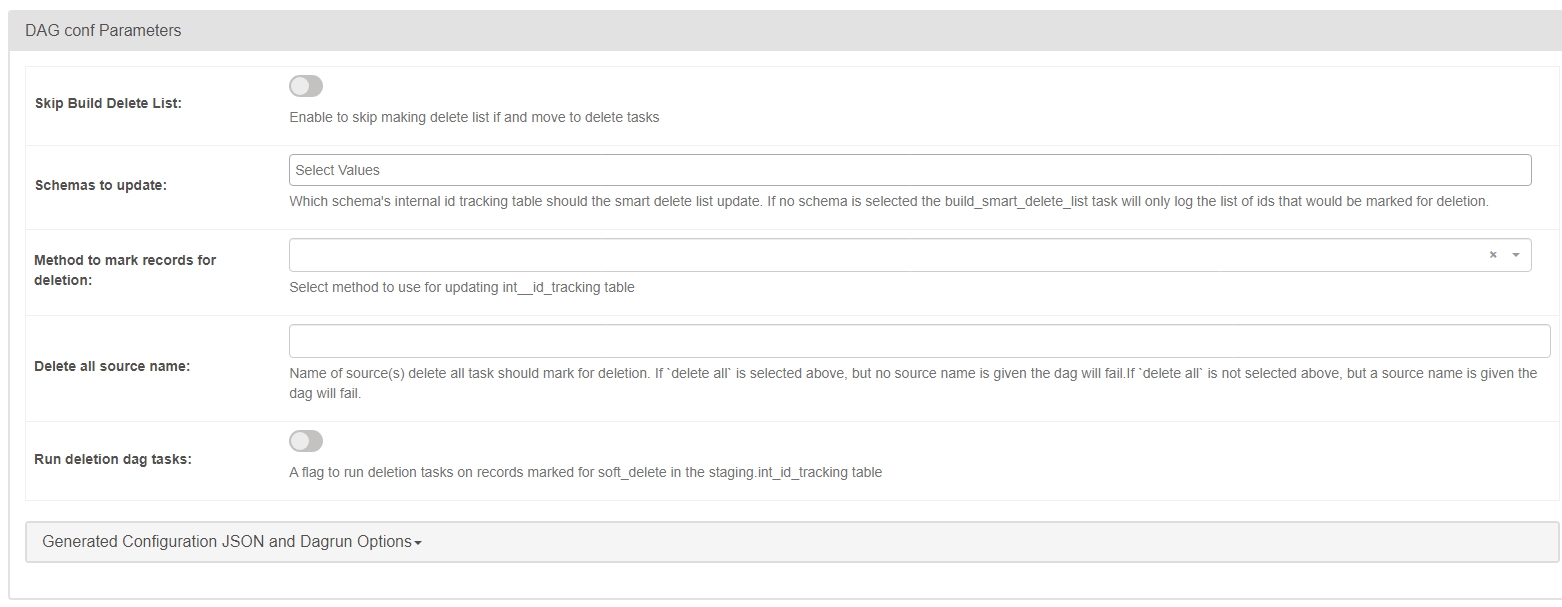
Users can configure the DAG using the following parameters:
-
skip_build_delete_list(boolean) Flag to skip updatingint_id_trackingtables and proceed directly to deleting records already marked for soft deletion. -
schemas_to_update(string) Dropdown selection for choosing which schema(s) to update in theint_id_trackingtable.- Options:
[landing, staging] - If left empty, the build lists will run but return nothing.
- Options:
-
method_to_mark_records_for_deletion(string) Dropdown selection for choosing the method used to mark records for soft deletion.- Options:
[smart delete, delete all]
- Options:
-
delete_all_source_name(string) Input field specifying the source name for the "delete all" method. -
run_delete(boolean) Flag to skip the Salesforce deletion tasks.
Smart Delete Generation
The Smart Delete feature allows for the deletion of entire "account trees" from the internal database. It retrieves Salesforce IDs from the utilities.to_smart_delete table and traverses the landing schema, deleting all related records in a structured manner. Once deleted, the data is no longer pulled into staging and is not uploaded to Salesforce.
Exclusion Handling
Any Migration IDs in the utilities.to_smart_delete_exclude table will be skipped, along with any related records in the tree.
to_smart_delete(schema:utilities)- Column:
id(Salesforce ID) - Populated by the migration team.
- Column:
to_smart_delete_exclude(schema:utilities)- Column:
id(Migration ID) - Prevents deletion of linked records.
- Column:
Process
Smart Delete works by processing each account individually and marking all dependent records for deletion. Dependents are identified using the schema configuration shared with the upload process.
to_smart_deleteis joined toAccount.- The specified Salesforce ID is marked for deletion.
- A breadth-first search (BFS) is performed, following foreign key relationships to find and mark dependents.
- If a Migration ID is found in
to_smart_delete_exclude, that branch of the BFS is terminated. - Once all entities are marked for deletion in
staging.int__id_tracking, the process completes.
Delete All
The Delete All method allows for bulk deletion of all object types from a specified Salesforce source.
- It marks all records in
staging.int__id_trackingfor soft deletion where theint__sourcematches thedelete_all_source_nameargument.
Soft Delete Flag
Records marked with soft_delete = true in staging.int__id_tracking will not be removed on subsequent runs. If Smart Delete needs to be rerun, this flag must be manually set to false.
Process Overview
-
Validate Parameters
- Ensure valid user inputs.
- If
skip_build_delete_list = false, amethod_to_mark_records_for_deletionmust be selected. - If
delete_allis selected,delete_all_source_namemust be provided.
-
Determine Mark for Deletion Method
- Will be one of these options:
smart_deletedelete_all- None (Only valid when
skip_build_delete_list = true. Will skip directly to "Run Delete Decision").
- Will be one of these options:
-
Run Deletion Decision and Execute Deletion Process
- Will either
- Skip the remaining DAG execution (if applicable).
- Proceed to the deletion graph workflow.
- Will either