How to Data Seed - Refreshing a Data Source using Monarch
In some cases during a migration process it may be useful to take data from your production environment and migrate it into a lower environment. The process for doing this is similar to a standard Monarch data migration without the overhead of writing transformations. By treating the lower environment as a target and the higher environment as a source, it is easy to use the backbone of Monarch's pipeline to move data between environments.
Prerequisites
- Read access to the source Salesforce environment(s)
- Read and write access to the target Salesforce environment
- A transformation project is set up for each source and target. This includes the transformation DBT project as well as a script to copy it to landing
Process
-
Configure the source(s) and target Salesforce instances. See the config schema docs for details. All columns are required except
bulk_query_max_records. For the target, thetargetflag must be enabled and theprotectedflag must be disabled. For each source,targetmust be disabled andprotectedcan be enabled or disabled (it doesn't matter which). -
OPTIONAL - run the Data Seed Setup DAG
-
Run DAG full_data_seed. Follow the instructions and select the options you want for your seed:
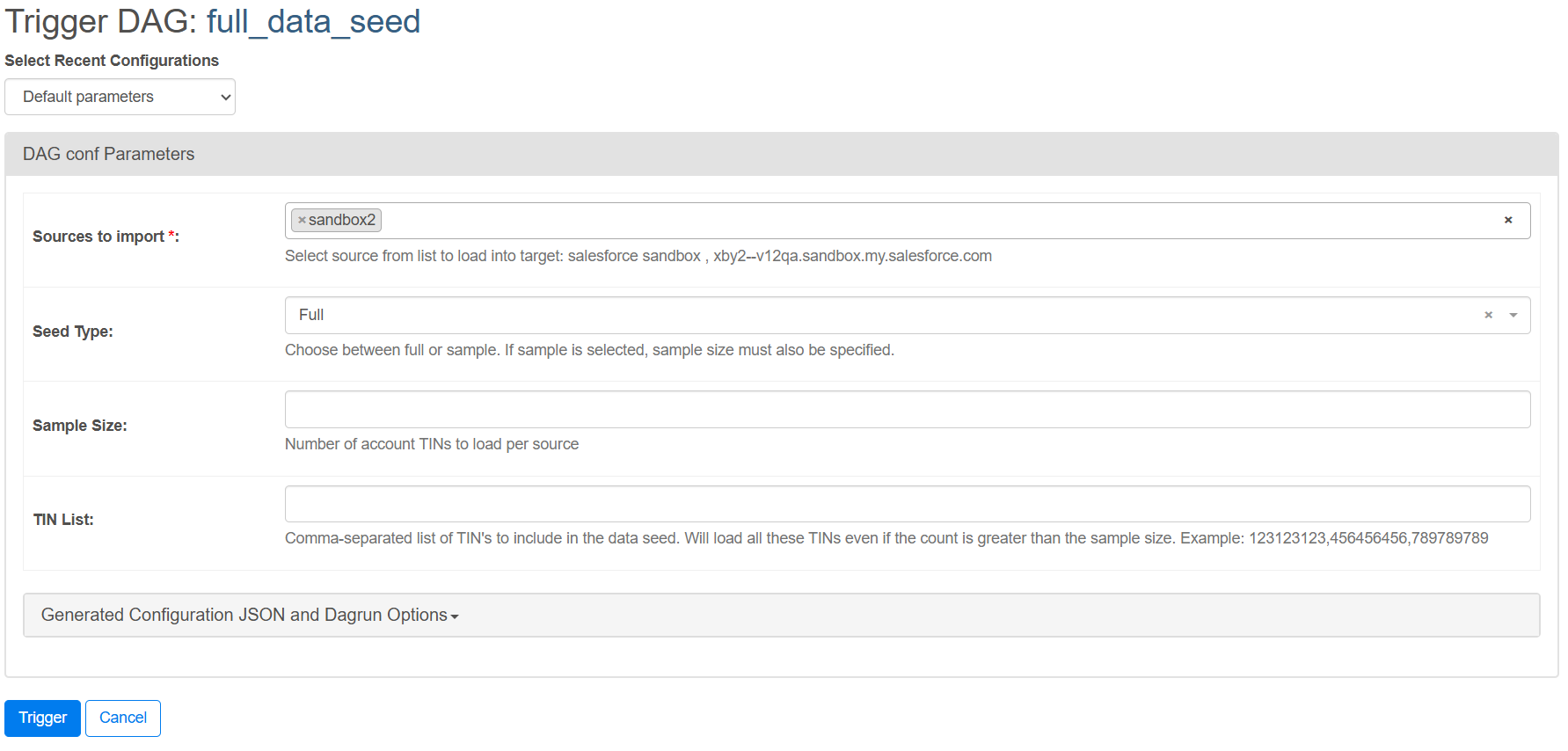 This will pull the data from the source(s) and target, delete everything from the target Salesforce instance, then upload the data from each source to the target Salesforce instance. The deletion and upload adheres to the object configuration for the target.
Data Seed Setup DAG
We have created DAG data_seed_setup to automatically create and configure files and settings required for data seeding. It can:
- Enable all fields in the
lookupandobject_fieldconfiguration tables- This is useful for quickly setting up the data load configuration for a new object
- This will not override changes made by a user
- Generate DBT transformation models and Monarch copy scripts based on object_meta.json and raw schemas
- This way you don't need to write them from scratch. If data masking is configured, these will also be pulled into the transformation model
Data Masking
You can configure Monarch to mask specific fields on objects when generating DBT transform models in the data_seed_setup DAG. To set this up, add a row for the source in the utilities.key_value table with:
- Key - A string containing the source name
- Format:
source_<source name>_data_mask
- Format:
- Value - A jsonb list of configuration objects where each object has a
field,object, andstatement- Format:
[{"field": "<field name>", "object": "<object name>", "statement": "SQL statement for masking"}]
- Format:
Example:
- Key:
source_sandbox2_data_mask - Value:
[{"field": "phone", "object": "contact", "statement": "REGEXP_REPLACE(phone, '.+(?=\\d\\d\\d\\d$)', '555-555-')"}, {"field": "email", "object": "contact", "statement": "REGEXP_REPLACE(email, '@.+$', '@fake.email')"}]
With this configuration, the transformation file for the contact object would have masking logic in place for the phone and email fields and result in a DBT model like this:
select
    id,
	lastname,
	firstname,
	REGEXP_REPLACE(phone, '.+(?=\d\d\d\d$)', '555-555-') as phone,
	REGEXP_REPLACE(email, '@.+$', '@fake.email') as email,
	...
from raw_sandbox2.contact